Using an External Media Library
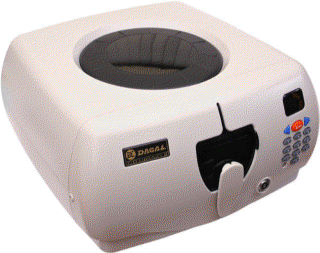 Some
DVD collector’s use a media library to organize their collection and reduce
the volume taken by individual cases. The DVD Register supports the DACAL CD-101
or CD-300 Intelligent Media Library. DACAL is a Taiwanese Manufacturer of
plastic injection molded products. Various distributors and Internet retailers
sell the product in the USA. For retailers that sell the DACAL media library
search on the Internet for "DACAL CD-300". The media library or carousel
contains slots for 150 DVDs. The device has a USB interface to a PC and can
respond to commands from the PC to select a particular slot and eject a disk.
Each device contains a single port USB hub and several devices can be linked in
a daisy chain.
Some
DVD collector’s use a media library to organize their collection and reduce
the volume taken by individual cases. The DVD Register supports the DACAL CD-101
or CD-300 Intelligent Media Library. DACAL is a Taiwanese Manufacturer of
plastic injection molded products. Various distributors and Internet retailers
sell the product in the USA. For retailers that sell the DACAL media library
search on the Internet for "DACAL CD-300". The media library or carousel
contains slots for 150 DVDs. The device has a USB interface to a PC and can
respond to commands from the PC to select a particular slot and eject a disk.
Each device contains a single port USB hub and several devices can be linked in
a daisy chain.
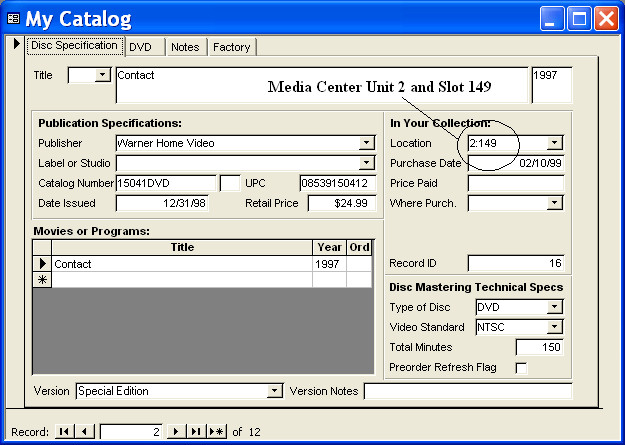
You can use a command button in
the Discs Form toolbar to request that the current title be ejected from the
carousel. You must enter the location of the title is entered into the catalog
at the time that the carousel is loaded.
Links about the DACAL Unit:
The Manufacturer's Web Site
Detailed 3rd Party Review
Buy at CyberGuys.Com
Buy at CrazyPC.Com
Discussion and Support Forum at ITechCDs
Using Multiple Libraries:
If you have more than one media
library then you will need to assign unit numbers so that the DVD Register can
distinguish among the devices. The manufacturer assigns each media library a
machine identification number or Machine ID. For each Machine ID you can assign
an alias or logical Unit ID. Use the Tools>Options:Devices form and click the
command button to "Assign Unit Alias".
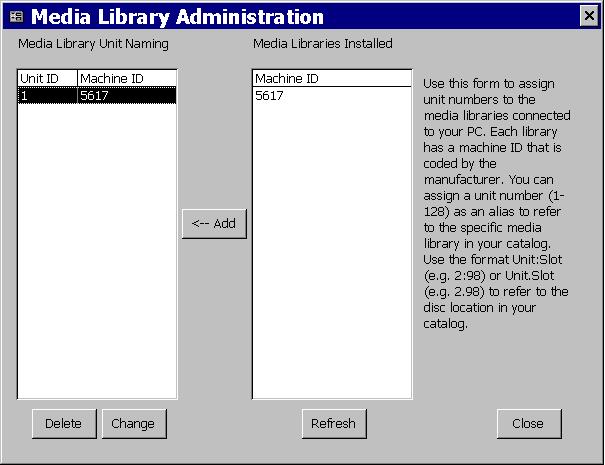
In the right hand list you will
see a row and Machine ID for each media library connected to your PC. Select a
row and click on the command button between the two lists showing. In the pop-up
you can select an integer from 1 to 128. Click OK. You will then see in the left
hand list the assigned Unit ID next to the associated Machine ID. The directory
relationship between the Unit ID and Machine ID is stored in the Windows
Registry. If you move to a new PC you will need to reassign your Unit IDs on the
new PC.
To delete a Unit ID that you no
longer need, select the desired row in the left hand list and click the delete
key. To change a Unit ID select the desired row in the left hand list and click
the change key and you can select a new Unit ID for the entry. To swap Unit IDs
it is best to delete both entries and then add them back from the right hand
list using the assign command button (right arrow). When you change or swap Unit
IDs, you will need to manually update the entries in your catalog that include
the affected Unit IDs.
The DACAL media libraries are USB
devices and are plug-and-play. If a device does not appear in the right-hand
list, then you should unplug it and then plug it back in. You can use the
Refresh command button to refresh the list of devices connected to your PC. If
the device is still missing from the list, then you should use the Control Panel
and check the hardware connected to your PC with the Device Manager. Each DACAL
device will be shown as a USB Human Interface Device. If the device is not shown
in the Device Manager then your PC does not know it is connected and therefore
the DVD Register software will also not know about it.
There is also a diagnostic
button on the tab to test communications with the media library device(s)
without the need to open the Administration Form.

Copyright © DVD Register. All rights reserved.
Revised August 17, 2009